Building the next chapter for photo studios in Japan. Join the pilot.Join for free
01 — Family records for photo studios

Remember the family. Welcome their next chapter.

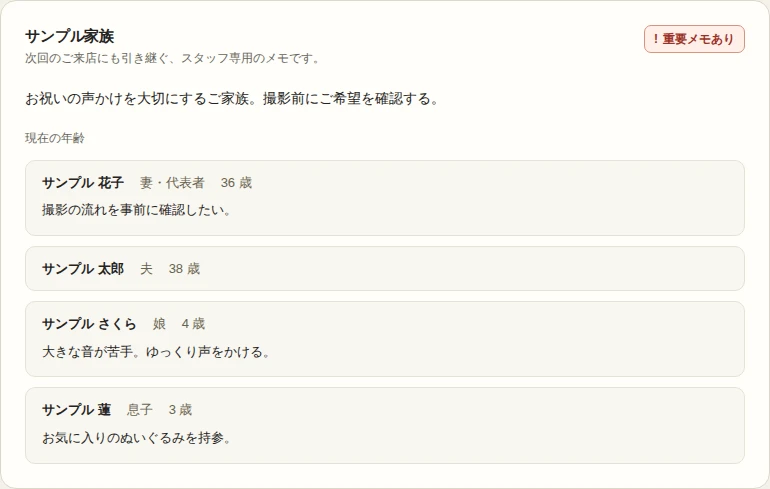
Keep names, relationships, birthdays and personal preferences in one family record, ready for the next visit to your studio.

Family recordTsumira Foto
Sample familyFamily record
Mother
Father
Daughter · 5
Son · 3
For their next visit

Pale pink kimono last time. Shichi-Go-San for both children this year.

Illustrative example with a fictional family
A moment from studio life.

A familiar welcome, even after a few years.

The baby from an Omiyamairi session returns for Shichi-Go-San. Open the household to recall siblings’ names, birthdays and individual preferences, even when another staff member is welcoming them.

What this makes possible.
01

One household, individual people.

Save the primary contact and optional family name, then add each relative. Relationships are free text, including parents, children, grandparents and guardians. Relatives do not need their own email addresses.

02

Age in the right context.

Known birth dates show age today in the profile and age on the appointment date in a booking. Unknown birth dates can stay empty.

03

Carry personal knowledge forward.

Use individual notes for a person’s preferences and family notes for information needed on future visits. Search by household or relative’s name.

See the product for yourself

Actual Japanese interface, captured in a disposable test studio using fictional records.

Family records for photo studios — Actual Japanese admin screen with fictional family dataEnlarge the screen ↗
Make it part of your day.
  1. 01

    Save the primary contact

    Enable Family record in the customer editor and enter contact details.

  2. 02

    Add the family

    Save names, relationships, optional birth dates and personal notes.

  3. 03

    Prepare the next session

    Review the family and start a new booking from their customer profile.

Capabilities and scope

Family records
Keep names, relationships, birth dates and personal notes for family members. Search by family name or a relative’s name.
Questions & answers

Before you bring it to your studio.

Can I record guardians and different family relationships?

Yes. Relationships are free text. Record the family’s actual relationships and handle sensitive service context carefully in staff notes.

Are birthdays required?

No. Save the name and relationship, then add a birth date later if it becomes known.

Can records span grandparents and future generations?

Add relatives to a family and record attendees for each session. Separate customer records are not automatically merged, and an automatic genealogy tree is not included.

Tsumira Foto · Founders Pilot

Make the next welcome feel like their studio.

Picture your own families, your team and your next appointment. Start exploring personal customer care in the Founders Pilot.

Join the Founders PilotPlatform access is expected to be free through June 2027.Browse all features →